Product
Platform Updates: Experiment Methodology, Video Retention, and AI Analysis

Two weeks ago, we announced a $15M Series A led by Lightbank and Health Velocity Capital. As explained in the announcement, we're investing the money into building the best possible platform for healthcare marketers. Here are some of the improvements we’ve made in just the last few weeks, centering on three main areas: the statistics behind experiment results, what our Video Player can tell you about individual videos, and AI analysis of the reports you already run.
Here's what's new:
The Line Items
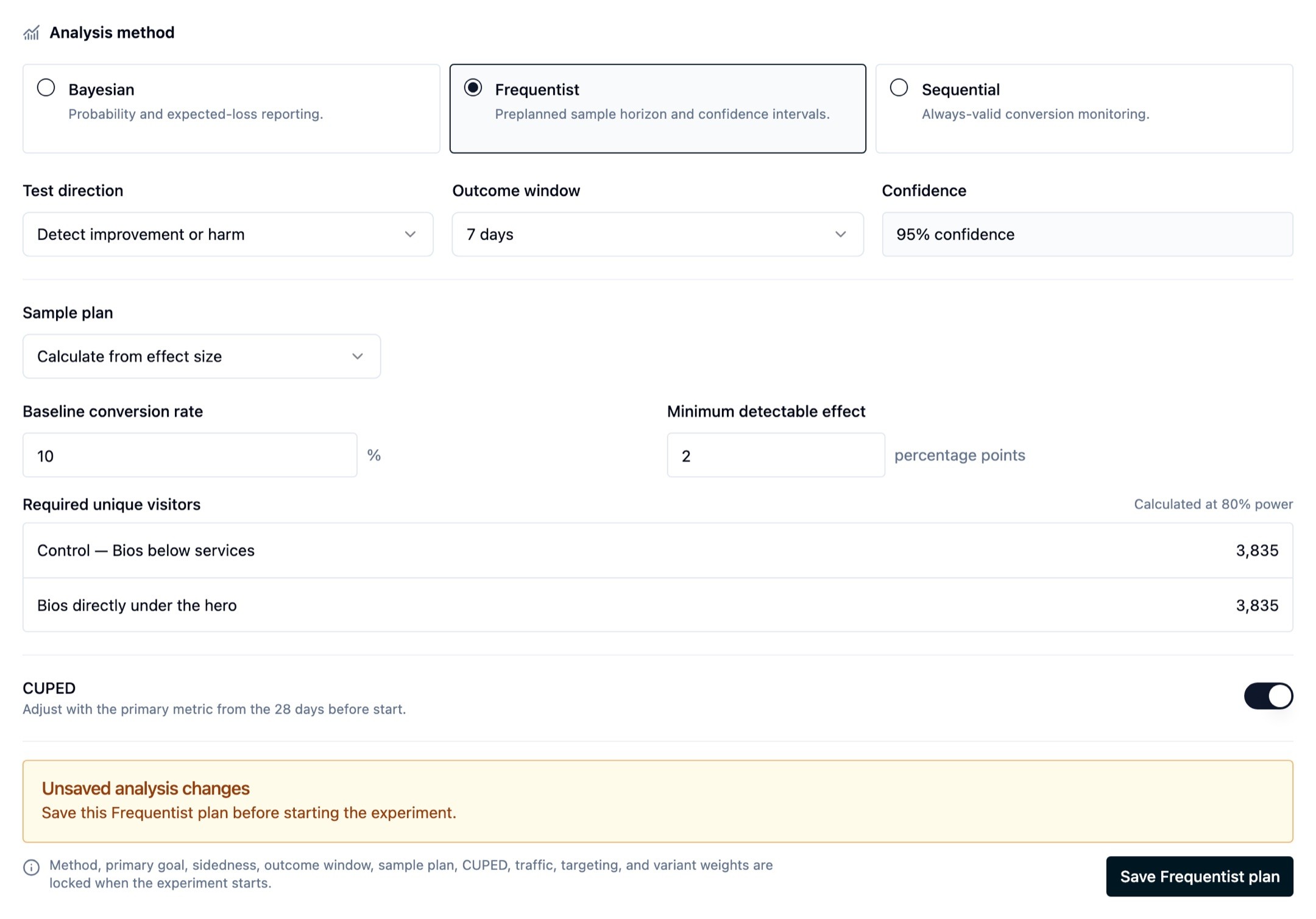
Pick the statistics behind an experiment result. Choose Bayesian, frequentist, or sequential while the experiment is still a draft. Bayesian stays the default and updates as visitors arrive. Frequentist commits you to a visitor target before launch and offers CUPED, which uses earlier visitor activity to tighten the read. Sequential gives always-valid intervals on conversion goals, so looking at the numbers on Tuesday costs you nothing on Friday. The method locks when the experiment starts, so a result stays comparable to itself for its whole run. (Experiment methodology)
Preview and edit content experiments as drafts. Preview a draft against the target URL before you create the experiment, which is where an unmatched selector should surface. Reopen a draft and edit its modifications rather than deleting the experiment and rebuilding it. Duplicating an experiment carries its variants across, and you can rename them from the dashboard. (Content experiments)
See where attention holds inside a video. Every video's report now draws an audience retention curve across the length of the video, with opening retention called out above it, beside average watch time, forward skips, and rewinds. Watch time counts intervals a visitor actually watched, so dragging the scrubber to the end does not inflate it. (Video Analytics)

Player controls visitors expect from any other video. Playback speed is adjustable via keyboard within inline and lightbox players. A start-time link opens a video to the precise moment you want someone to see, which makes it citable from an email or a support reply. Floating playback pins an inline video in the corner when a reader scrolls past it, with an obvious close button, no animation for a visitor who asked their system for reduced motion, and no duplicate start or completion events. (Embed configuration)
Poster frames you pick yourself. Scrub to any frame in the video and set it as the poster, instead of choosing among four captured at transcode time (with those four kept as quick picks). Video Channels also became configurable from the embed code and reachable over the REST API. (Thumbnails and posters, Video Channels over the API)
AI analysis of the reports you already run, in beta. Session replay summaries tell you what happened in a session, with clickable markers that jump the player to each moment. Heatmap analysis reads click bins, dead clicks, rage clicks, and scroll depth for one page or across your top pages. Funnel analysis returns evidence-backed findings on the funnel as you have it scoped. Audience performance insights cover period-over-period conversion and revenue movement and the sources behind it. Web Scanner conversion findings come out of evidence the compliance scan already collects. Request access.
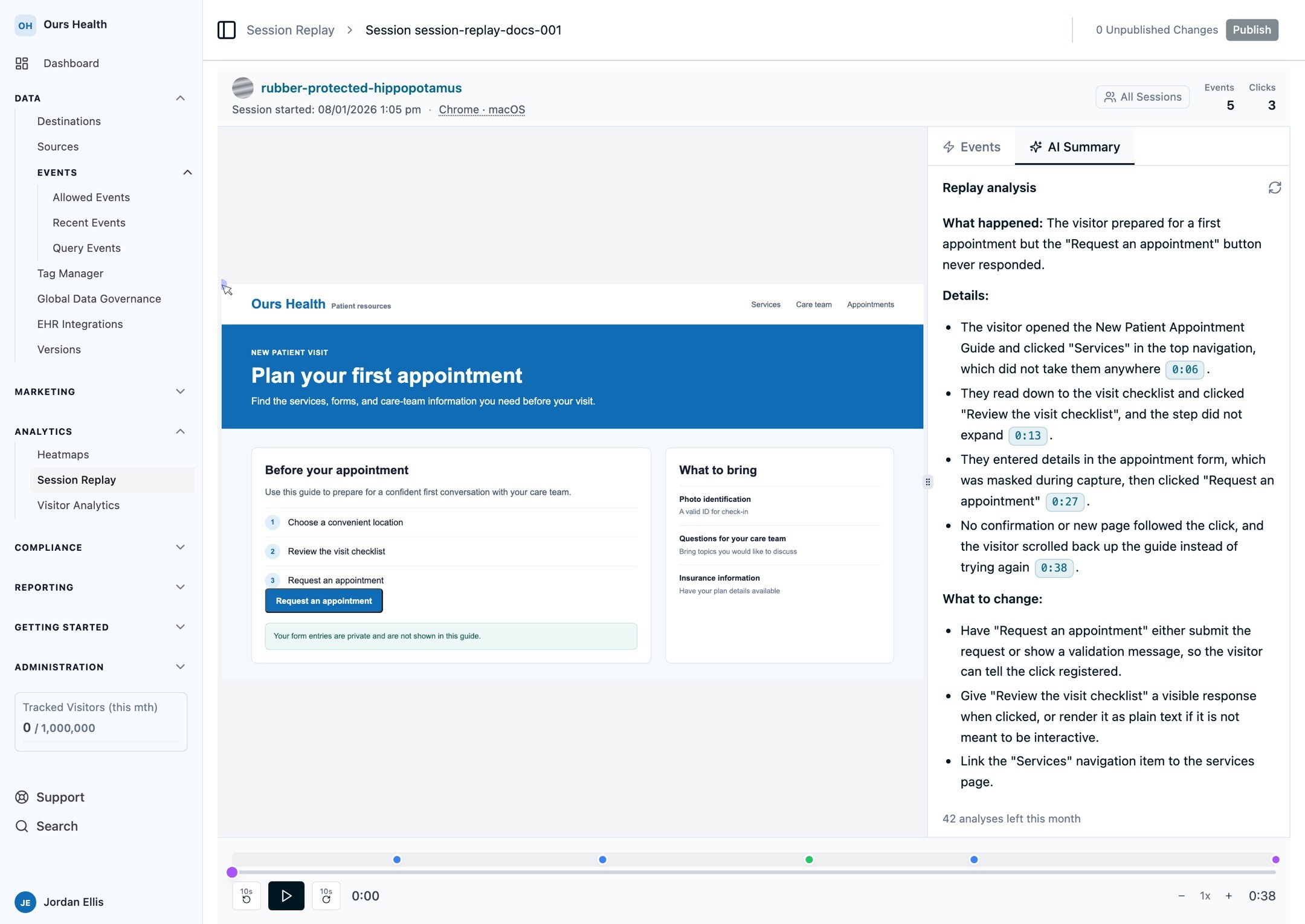
The model gets no tools. Every AI entry point authorizes the caller, fetches data itself scoped to your organization, and makes one call to Claude inside our own AWS account, under the BAA you already signed. There is no tool-use loop and no query surface exposed to the model, so a prompt injection sitting in your page text has no path to data the caller could not already read. The analysis reads aggregates: step counts, rates, timing, click bins. A visitor-level record never reaches the model. (Session replay AI summaries, reading heatmaps)
Four more destinations, and improvements to the ones you have. Fullstory joins the catalog for server-side product analytics, and MNTN audience sync is live for connected-TV targeting. Customer.io now accepts anonymous events before a person is known and associates that activity with the profile once they are identified. Amplitude gained fixed experiment event mappers, and destination error notifications route per destination, so a noisy one can go somewhere quieter without muting alerts on a critical one. (Fullstory, Customer.io, MNTN audiences, every integration)
More compliance artifacts for your legal team. Consent Analytics exports to PDF and CSV. Subject Export carries the full dispatch trail beside the consent record in Excel and PDF: which destinations fired for a visitor, what was sent, and the consent state at the time of each dispatch. A visitor audit timeline takes an ID or an email and shows that history in one place, which is the shape a data subject access request asks for. Consent also moved from Marketing to Compliance in the navigation. (Subject Export, Consent Analytics)
Exports and filters across reporting. Conversion Attribution and Event Attribution Insights both export to CSV, which makes reconciling counts against Meta and Google Ads a spreadsheet job. Event Reporting picked up the filter bar and saved segments from Web Analytics on all three of its pages, and Data Health tabs gained a source filter. (Conversion Attribution, Event Attribution Insights)
Funnels and heatmaps. Duplicate a funnel from the builder and search the funnel list. Heatmaps split by a significant query parameter, so a questionnaire tool serving twenty pages from one pathname gives you a map per question. (Funnels)
Tag manager enhancements. Tags, triggers, and variables copy across sites, which is the difference between configuring forty clinics and configuring one. Click triggers accept CSS selector matching, an attached trigger card opens straight into the trigger editor, you can create a variable while configuring a tag, and renaming a variable updates every reference to it. The Ours Init tag exposes the session replay text-masking selector, so masking needs no custom initialization code. (Triggers, variables)
Short links improvements. New links mint a compact /r/{code} path, and the code is what gets copied and QR-encoded. The default event name and UTM values ride on the link itself, so the same event is recorded without the parameters appearing in the URL. (Managing short links)
API key administration. Scopes are searchable in the create-key dialog: type "video" or "consent", see the matches, select them in one click. The Videos scopes live under Videos now, matching the product name in the sidebar. Expired keys stand out in the list and clear in bulk.
Every docs page that describes a screen now shows it. That backfill covered a couple of hundred pages and is down to its last three. The docs site also gained a homepage and a complete directory of every source and destination one click away, built from the catalog so it stays correct without anyone maintaining it. (Documentation)
What's Next
More of all of it. We are building into every part of the platform: the CDP and the destinations it feeds, consent and compliance, analytics and attribution, the tag manager, Video, and experimentation. What the Series A buys is more of this work at once, and the requests customers send us help us decide on the order.
If you want the AI analysis layer turned on, or you have a video library sitting on a consumer platform, book a demo and we will walk through it.
Related Articles
Newsletter
Stay up to date
Subscribe for privacy news, feature updates, events, etc.
